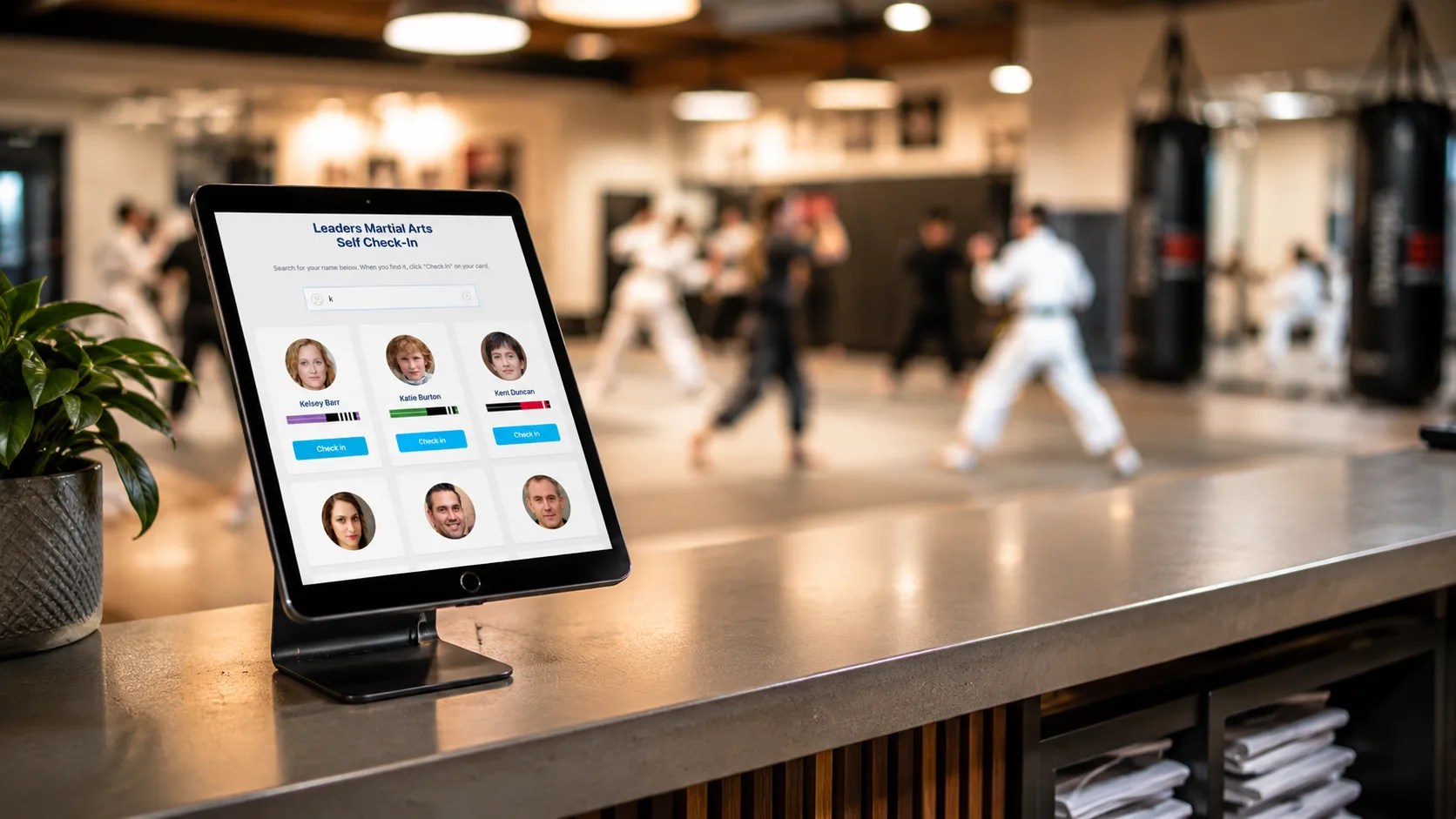
Martial Arts Front Desk Kiosk: Replace Your Check-In Desk With a Tablet

#Kiosk Mode #Attendance #Martial Arts Software #School Management #Check-In
I started thinking differently about attendance after a call with one of our members.
He runs a small martial arts program out of a combo gym, and he was tracking attendance the way a lot of schools do at first: memory, group texts, paper notes, and whatever system happened to survive the week.
Then he told me about a grandmother texting him at 3 a.m. because she thought her granddaughter was already falling behind after only a few classes.
The class had been basic kicks and blocks. Nothing advanced, nothing the new student had missed. But in that moment, he didn’t have a clean attendance record or class history to point to. He had his memory, and she had her worry.
Attendance is more than just who showed up to class. It also gives you clues about the health of your school. It shows up in how you answer parents, spot students who are slipping away, make belt testing fair, and run your school without relying on memory.
That is why I wanted to do a dedicated deep dive on Kiosk Mode. As part of MartialArts.io’s martial arts attendance software, it turns a tablet at the door into a self check-in station, so attendance records build themselves while instructors stay on the mat.
This guide covers exactly what Kiosk Mode does, how to set it up in two minutes, and why a tablet you probably already own can do the job your front desk has been doing by hand.
TL;DR
- Kiosk Mode turns a tablet into a self check-in station for your martial arts school
- Students check themselves in by searching their name and tapping “Check In”: no passwords, no app
- Setup takes about two minutes: open MartialArts.io on a tablet, go to Attendance → Kiosk, tap “Launch Kiosk”
- Your data stays locked: launching the kiosk signs your account out, so students only ever see the check-in screen
- It replaces front-desk check-in work, kills the line at the door, and records attendance automatically
- Included on paid plans (Basic, Deluxe, and Premium); it’s one of four ways to track attendance in MartialArts.io
What Is a Martial Arts Self Check-In Kiosk?
A self check-in kiosk is a type of self-service kiosk you place at your front desk or by the door. Instead of an instructor or receptionist marking who showed up, each student records their own attendance the moment they walk in.
Kiosk Mode is the self check-in screen built into MartialArts.io. The student-facing screen is deliberately simple. It shows your school name, a search box, and one instruction: “Search for your name below. When you find it, click Check In on your card.” No login. No app to download. No password to forget.
Behind that simple screen, every tap writes a real attendance record tied to that student, that class day, and their current belt rank. It’s the same data you’d get from manual check-in, just captured automatically the moment they walk through the door.
How to Replace Your Martial Arts Front Desk With a Tablet
A traditional front desk does a few things at class time: greet people, find their name, mark them present, keep the line moving. Kiosk Mode handles the “find their name and mark them present” part instantly, for everyone, at the same time.
Here’s what changes the day you set it up:
No more bottleneck at the door. Several students can check themselves in within seconds of each other. Nobody waits for one staff member to work down a list.
No staff tied to the desk. Your instructor stays on the mat. A solo school owner doesn’t have to stop warming up class to log arrivals.
No paper, no transcription. There’s no sign-in sheet to type up later. The record is digital the instant a student taps “Check In.”
Fewer errors. Students pick their own name from a list, so you don’t get illegible handwriting or attendance marked to the wrong person.
For most small and mid-size schools, that’s the bulk of what the front desk was doing at class time, handled by a tablet propped up by the door.
How Does This Compare to a Clipboard or Sign-In Sheet?
A lot of schools are running on a paper sign-in sheet or a clipboard someone fills out at the door. That works until it doesn’t. Handwriting gets messy, names get skipped, and someone has to type it all up later. A shared spreadsheet is one step better, but it still requires a device, a login, and someone managing the sheet.
Kiosk Mode skips all of that. The record is created automatically, it’s tied to the right student profile, and there’s nothing to transcribe after class. If you’re currently doing attendance by hand and spending even five minutes per class sorting it out, a tablet kiosk pays for the setup time in the first week.
How to Set Up a Self Check-In Kiosk for Your Martial Arts School
Setup takes about two minutes. You don’t need special hardware. Any tablet with a browser works.
- Open MartialArts.io on the tablet and log into your account as you normally would.
- Go to Attendance → Kiosk in the menu.
- Tap “Launch Kiosk.”
- The tablet switches into Kiosk Mode. Your admin session is signed out automatically, and the screen now shows the student self check-in view.
- Leave the tablet at the front desk. Stand it on a stand or mount it by the door.
The kiosk stays in self check-in mode all day, so students can keep checking themselves in class after class without you touching it.
How Do Students Check In?
From the student’s side it couldn’t be simpler:
- Walk up to the tablet
- Type their name in the search box
- Tap their name when it appears
- Tap “Check In”
- See a confirmation and head to class
Search results appear as you type, and names that start with what you’ve typed float to the top, so “Jo” surfaces “Jordan” before someone with “jo” buried in the middle of their last name. Most students are checked in within a few seconds of walking through the door.
How Do You Exit Kiosk Mode?
At the end of the day, tap the lock icon at the bottom of the kiosk screen and sign out. The tablet returns to the normal MartialArts.io login, ready for an instructor to log back into the full app.
Is It Secure to Leave a Tablet Out at Your Front Desk?
This is the right question to ask. When you launch Kiosk Mode, MartialArts.io signs your account out of that tablet completely. The kiosk runs as its own limited session that can do exactly one thing: check students into class.
Students, or anyone who picks up the tablet, cannot reach your student records, payments, billing, settings, or any other school data. The check-in screen is all that exists on that device until a staff member exits the kiosk and logs back in. Your business information stays protected even though the tablet is sitting out in the open.
What Plans Include Kiosk Mode?
Kiosk Mode is included on MartialArts.io’s paid plans: Basic, Deluxe, and Premium. If you’re already on a paid plan, it’s waiting under Attendance → Kiosk right now. Nothing extra to buy or install. Every kiosk check-in feeds the same martial arts student tracking software record as every other entry method, so each student’s history stays complete no matter how they check in.
It’s one of four ways to track attendance in MartialArts.io, alongside attendance cards, scanners, and simple click entry, so you can mix self check-in with staff-assisted methods however your school runs. See the full attendance tracking options to compare all four.
Is a Self Check-In Kiosk Right for Your School?
Kiosk Mode pays off most for:
Solo instructors and small schools who don’t have a dedicated front-desk person and can’t afford to stop teaching to take attendance.
Busy schools with back-to-back classes where a single check-in line creates a logjam at the door between sessions.
Owners who want clean attendance data for member retention, belt promotion eligibility, and catching students who’ve quietly stopped showing up, without the manual data entry.
If you’ve ever had to stop a warmup to mark attendance, or spent time after class deciphering a sign-in sheet, a tablet at the door solves both of those problems starting day one.
Frequently Asked Questions
Do students need a password or app to check in? No. Kiosk Mode requires no login and no app. Students search their name, tap their card, and they’re done.
What tablet do I need? Any tablet with a web browser works. An iPad is the most common choice, but Android tablets work too. You open MartialArts.io in the browser and launch the kiosk from there.
Can students see my school’s data on the kiosk? No. Launching the kiosk signs your account out of that device. The only thing on screen is the self check-in interface.
Can I use a phone instead of a tablet? Technically yes, but a tablet is much better for this. Phones are small enough that students have to lean in and squint, which slows things down. A tablet mounted at standing height is the right size for a quick tap-and-go.
What if a student’s name doesn’t show up? If a student searches their name and nothing appears, they’re likely not in the system yet, which usually means they haven’t been added as a member. A staff member can check them in manually from the full app or add them before the next class.
Can I use Kiosk Mode for multiple classes in one day? Yes. The kiosk stays active all day, so students from every class check themselves in through the same screen. Each check-in is recorded with the date and time, so you can see exactly which class each attendance belongs to.
Do I need Wi-Fi for the kiosk to work? Yes. Kiosk Mode requires an internet connection to record attendance in real time. A stable Wi-Fi signal at your front desk is all you need.
Get Off the Desk and Back on the Mat
That call with our member is what I keep coming back to. The stressful part wasn’t just that a grandmother had a question at 3 a.m. It was that he had to answer from memory, without a clean record to lean on.
Your front desk was never the point of your school. The teaching is. Kiosk Mode takes that repetitive check-in work off your plate, hands it to a tablet, and gives you attendance records you can trust when questions come up later. Your instructors stay on the mat, your door stays clear, and your school stops depending on memory to know who showed up.
Already on a paid plan? Set it up before your next class. Open MartialArts.io on a tablet, go to Attendance → Kiosk, and tap Launch Kiosk. Two minutes and you’re done.
Not on MartialArts.io yet? See how attendance tracking works and put a self check-in kiosk at your door this week.
Join Our Newsletter
Sign-up for MartialArts.io's monthly newsletter. To be added to our newsletter list, please enter your email:
We care about the protection of your data. Read our Privacy Policy.
© 2026 MartialArts.io. All rights reserved.